How a dataset gets into CalCOFI.io, where its words live, and what a data provider or a member of the data team edits — and what they never have to. This chapter is for people who own or curate a dataset; the engineering detail behind each step is in CalCOFI/workflows and its CLAUDE.md.
One key, one record, one page
Every dataset has one key, {provider}_{dataset} (calcofi_bottle, swfsc_ichthyo, cce-lter_zooscan), and that key names everything about it: its folder of metadata in git, its row in its provider’s Google Sheet, its record in the release, and its page at calcofi.io/datasets/{key}/. A dataset is in one of three states (Table 9.1), and the key, the folder, the Sheet row and the page URL are the same in all three, so a link never breaks when a dataset moves forward:
Where the words live
Two kinds of fact describe a dataset, and they are kept apart on purpose:
- Authored — abstract, methods, who made it, how to cite it, its licence and DOI, the acknowledgement a use should carry. These live in one small file per dataset in git,
metadata/{provider}/{dataset}/dataset_meta.yml, and every public surface is generated from it: the dataset page, the EML document the portals read, the citation the apps copy.
- Measured — years and area covered, row counts, when the source was last fetched, whether a DOI resolves. These are computed when a release is cut and are never typed; a hand-written extent goes stale the moment the data grows underneath it.
The authored fields are tiered, so a provider sees the few that matter first. Table 9.2 reads the field registry live from the repository:
The Sheets, and what you may edit
Each provider organization (calcofi, swfsc, sio, cce-lter, cdfw, farallon, sccoos) has one Google Sheet, generated from git and synced back to it. It is titled CalCOFI integrated database — questions for <provider> and sits in a Shared Drive folder called questions — the questions came first, and the name stayed when the metadata and holdings tabs joined the same spreadsheet (2026-09-05). The folder is owned by the CalCOFI service account, so nothing depends on one person’s login, and the data team sends each provider the link to their own Sheet. A Sheet has three kinds of tab (Table 9.3):
Two rows deserve a note. visibility is a checkbox: internal keeps a dataset in the record and on the triage board but off every public page, the sitemap and data.json until the conversation with its provider is done. license must be one of the ids in the licence registry (CC-BY-4.0, CC0-1.0, US-PD, custom with a URL, …); anything else is refused when the Sheet is pulled, not discovered at release.
Questions, and what proposed means
Every question we have for a dataset’s owner is a row in metadata/{provider}/{dataset}/questions.csv (see the registries) and in that dataset’s Sheet tab. A row has a short label (Q07), the question, the context we already know, a priority, and a status:
open — we need an answer we do not have.proposed — we have already built or reasoned an answer and want it confirmed; the proposed_answer column holds it. Most rows are proposed, so a provider approves a solution rather than being handed a problem.answered and wontfix — closed, with the answer kept beside the question.
Questions reach a provider through the Sheet and, when a batch is ready, through one email drafted from the same rows. Answers come back the same way: the data team pulls the Sheet, the four answer columns are validated and written into questions.csv in one commit, and the next release carries whatever changed.
What happens after you edit
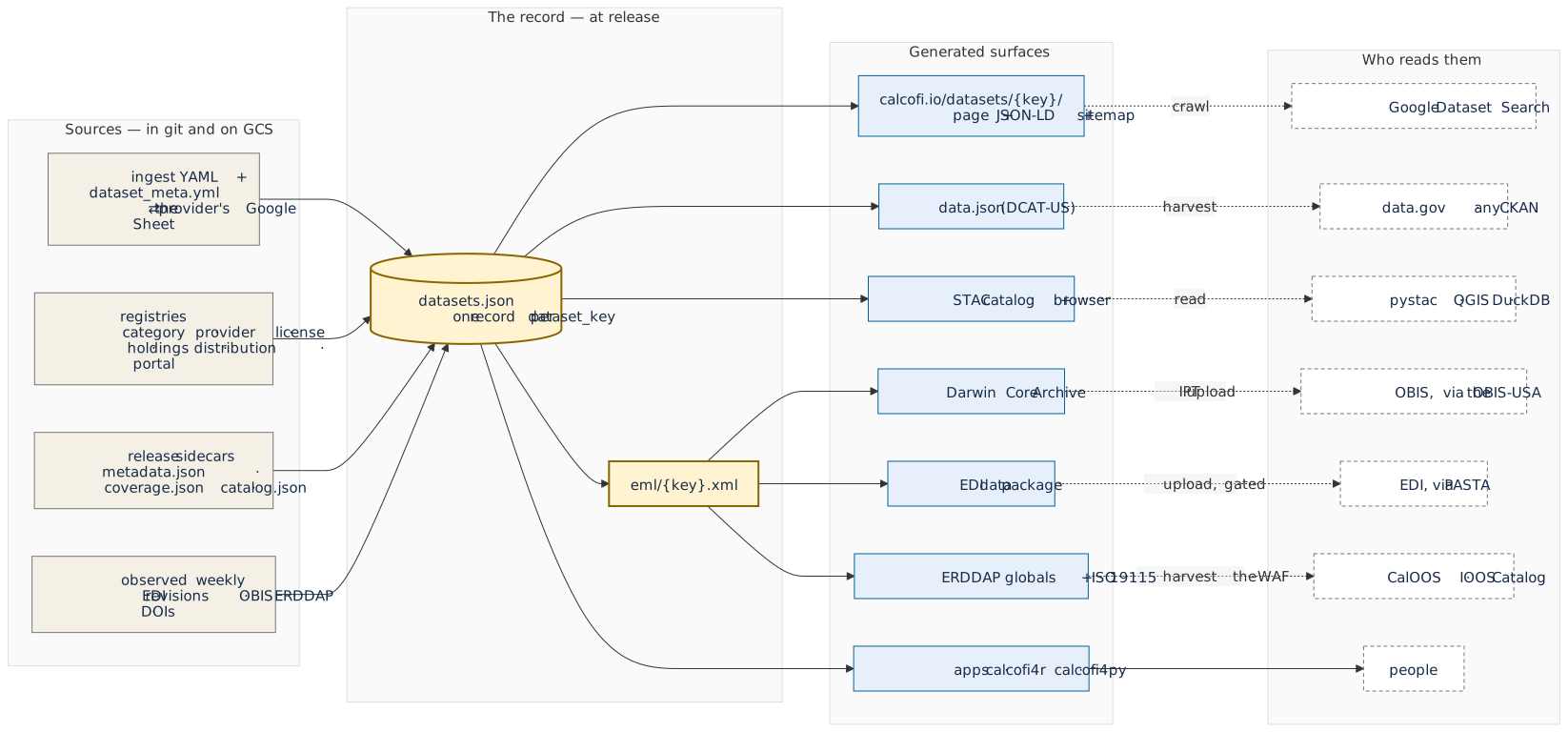
Nothing happens on the Sheet itself. The data team runs a sync (push to regenerate the tabs from git, pull to bring edits back; both are dry runs until told otherwise), which rewrites only the changed values in the sidecar and leaves its history and comments intact. The next release — cut every few weeks, each with its own DOI — then regenerates every surface from the record (Figure 9.1):
Between releases, a weekly job asks each portal what it says now about every dataset and holding — a new EDI revision, an OBIS re-index, an ERDDAP id that disappeared — and files a proposed question for the provider when something changed. It observes; it never edits the record.
A new dataset, end to end
Bringing a dataset in is a loop of five steps with a person at every hand-off:
- Explore — profile the source (columns, coverage, keys, provider), and seed the first questions from what the profile cannot answer.
- Metadata — map the source’s fields onto the shared field dictionary and measurement vocabulary; register the dataset’s key, category and descriptive sidecar.
- Ingest — a notebook (
ingest_{provider}_{dataset}.qmd) turns the source into the core tables, with the provider’s own identifiers kept as columns and the questions section at the end.
- Validate — keys, ranges, taxa and coverage are checked; every finding is either fixed or becomes a
proposed question.
- Release — the dataset joins the next frozen release, gets its page, its EML and STAC records, and its rows in the apps.
A dataset can stop after step 3 with in_release: false while its questions are open. That is normal, and it is what the holdings triage board is for: a holding’s next_step names which of these steps it is waiting on and who owns it.
See also
- The database schema — the metadata registries (including
variable.csv, the label registry for a measurement key shared across datasets) and the dataset table.
- Portals — where each dataset is archived and registered, and the policy per dataset.
- Cite this data — the citations the record produces.